


The Golden ratio unlocks a nature’s harmony, we see in the world around us. Beautiful never lacks proportion, and mathematics is the language of proportion.
The Golden ratio occurs in nature all the time. From a shell spiral, architecture, growth patterns of plants, the human form, and more. Using this ratio in our music it injects a kind of natural beauty, similar to Da Vinci’s portraits.

The golden ratio, also known as the divine proportion, golden mean, or golden section, is a number often encountered when taking the ratios of distances in simple geometric figures such as the pentagon, pentagram, and dodecahedron. It is denoted , or sometimes
 .
.
The formula for the Golden Ratio is:
a/b = (a+b)/a = 1.6180…
Here is an example of using the Golden Ratio. If we have a square (a) with a side = 1 we then divide it by 1.618 to get the size of b. This gives us a shape that uses this natural ratio.
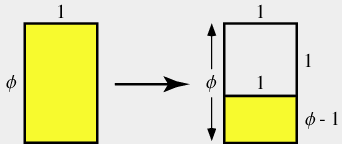
If we keep expanding on this we get the natural spiral in Shells and other natural forms.
 If you would like to read more on the Golden Ratio, then check out this article at Mathworld. Now lets look at using this ratio in out music.
Using the Golden Ration in Ableton Live
Here are some tips and techniques for implementing the Golden Ratio in your song.
Write the track and then apply the Golden Ratio:
I generally find it useful to first write out my song / composition. After I have it mostly laid out I can overlay the Golden Ration to the track. It can inform me when to put a break down, add a riser, or other such things on those critical moments in the golden ration.
To do this you first:
- Measure the length of your song in seconds.
- Calculate the segments in the Golden Ratio. To do this use the Golden Ratio Calculator. Remember that this gives you the time in seconds, so if it’s 130 seconds that is two divisions of 60 (minutes) and 10 seconds.
- Use this as an estimated place to add elements or change the composition in some form.
- You can also further divide the different sections into new segments of the Golden Ratio.
Starting a track with the Golden Ratio:
Another technique would be to first decide segment side, like 16 measures. You can then see how long that is in Seconds at your current BPM (changes compared to your BPM). You then follow the same steps in the above example.
You can then use these segments as anchor points as you build your composition. With this technique, it’s a great way to visualize where the drop will be, chorus, verse, and so on. Really helpful with Pre choruses.
Comment Below:
I would love to hear how you use this technique. Add a comment if you have a song you developed with the Golden Ratio, or have a technique you love to use. Also check out the Fibonaccii Effect Rack for more geometric goodness.


